
This page explains how parents and students receive notifications in Radix LMS. Notifications help families notice important updates such as new assignments, grades and feedback, messages, attendance updates, behavior records, and available reports.
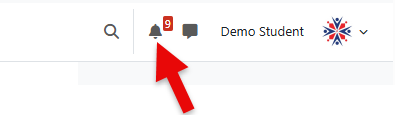
The notification bell appears in the top navigation bar after you log in. If you have unread notifications, a number badge appears on the bell.
Notifications can appear in Radix LMS, by email, and in the Radix Mobile app depending on your preferences and your school’s settings.
What notifications are for
Radix LMS notifications are meant to help families notice updates without checking every course or dashboard section one by one.
|
Notification type |
What it may mean |
|---|---|
|
Assignments |
A teacher posted a new assignment, updated an activity, or added feedback. |
|
Grades and feedback |
An assignment was graded or teacher feedback is available. |
|
Messages |
A teacher or school staff member sent a message. |
|
Attendance |
The school published an attendance update, if attendance notifications are enabled. |
|
Behavior |
A behavior entry, recognition, consequence, or referral update was recorded, if the school uses behavior notifications. |
|
Report cards and progress reports |
A report may be available for viewing or download, depending on school settings. |
Not every school uses every notification type. If you do not receive a notification for one of these areas, it may mean the school has not enabled that notification or the update is not published to families.
Open and read notifications
Click the notification bell to open the notifications menu. From this menu, you can:
-
Review your newest notifications
-
Mark all notifications as read
-
Open notification preferences
-
View the full notification list
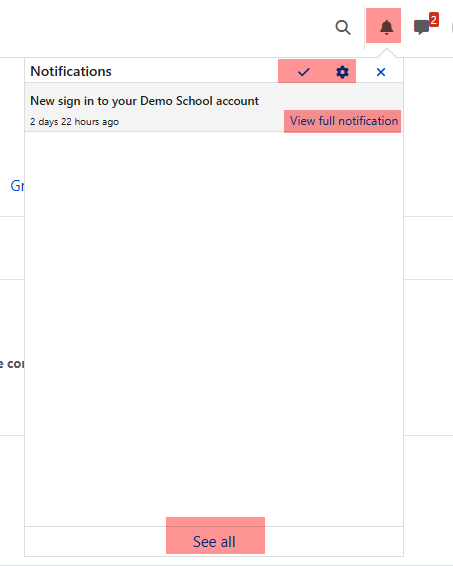
Click a notification to open the related item when a direct link is available. For example, an assignment notification may take you to the assignment or grade details, and a message notification may open the conversation.
If a notification does not open the page you expected, go back to the dashboard or course and check the related area directly. Some notifications depend on school settings, permissions, or whether the item is still available.
Choose how you receive notifications
-
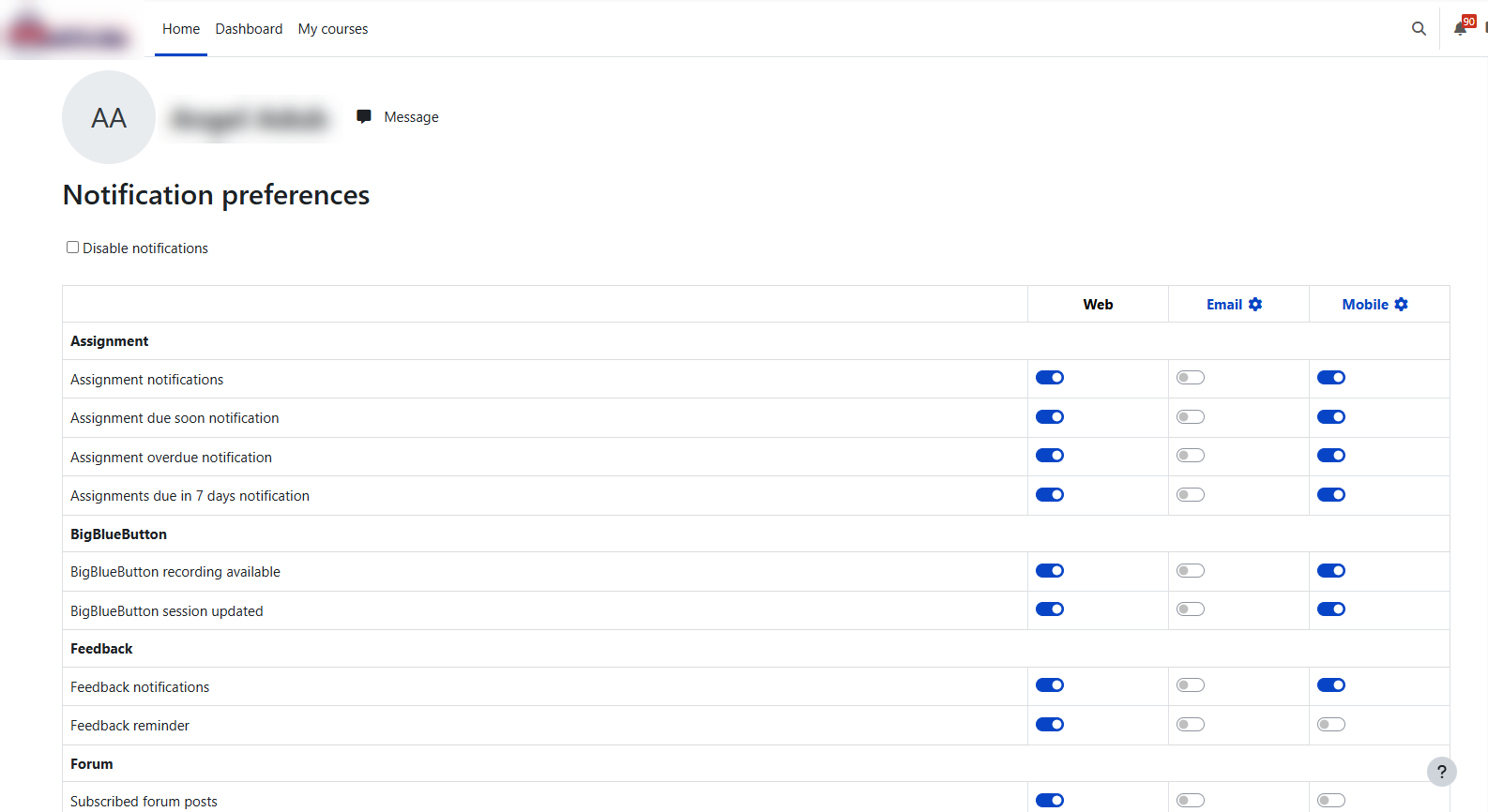
Open notification preferences from the gear icon in the notifications menu or from your user menu. The available options may vary by school, but families commonly see options for:
-
Web notifications — alerts shown inside Radix LMS while you are logged in
-
Email notifications — messages sent to the email address on your account
-
Mobile app notifications — push notifications sent to the Radix Mobile app, if you use the app and allow notifications on your device
Some preferences also include offline settings. These control whether Radix LMS saves notifications for you to see the next time you log in.
-
Mobile app notifications
If you use the Radix Mobile app, allow notifications when your phone or tablet asks for permission. Mobile notifications can help you see school updates faster, especially messages, assignment feedback, attendance or behavior updates, and consequence notices when your school enables them.
Parents with more than one student may see the student’s name in the notification so it is clear which child the update is about. After tapping a mobile notification, confirm that you are viewing the correct student and school in the app.
If you are not receiving mobile notifications, check both places:
-
Your phone or tablet notification settings for the Radix Mobile app
-
Your notification preferences inside Radix LMS
For more help using the app, see Mobile App.
Common questions
Why did I not receive a notification?
Notifications depend on your preferences and your school’s settings. Some schools do not enable every notification type, and some updates may appear only inside the dashboard or course.
Why does my notification look different from another parent’s notification?
Schools can configure some notification messages and templates. The wording may vary by school or by the type of update.
Can I turn off some notifications?
Yes. Open notification preferences and adjust the available web, email, or mobile app options. The exact options depend on school settings.
Who should I contact about a notification?
Contact your school if you have questions about the content of a notification, such as an assignment grade, attendance record, behavior entry, or report card. Radix LMS shows the information published by the school.
Related guides
-
Parent & Student Dashboard Guide — dashboard tabs, grades, report cards, messages, and notifications
-
Mobile App — using Radix LMS on a phone or tablet
-
Behavior on Student & Parent Dashboard — behavior records, recognitions, rewards, and behavior notifications
-
Attendance on Student & Parent Dashboard — attendance counts and attendance dashboard details