
Page width: Set this page to Wide in Confluence before publishing so the tables and screenshot callouts are easier to read.
Administrative Decisions connect behavior outcomes to the communication sent to families. In Radix LMS, they are the final decision labels administrators assign during behavior resolution and referral processing, and they can be paired with a letter template used for notifications and printable letters.
This page focuses on setup and configuration. The actual assignment of an administrative decision happens later during Behavior Resolution and Referral Processing.
Overview
Use this area to define the administrative decisions your school wants staff to choose from when processing behavior cases. Examples might include detention, conference, suspension, warning, parent meeting, reward approval, or other school-defined decisions. Each decision can be linked to one or more behavior outcomes and can also have a letter template for parent-facing communication.
|
Component |
Purpose |
Used In |
Why It Matters |
|---|---|---|---|
|
Administrative Decisions |
Defines the final decision options admins can assign |
Behavior resolutions and referrals |
Keeps decision labels consistent across the system |
|
Behavior Outcome |
Associates a decision with one or more outcomes |
Resolution workflows |
Helps decisions appear in the right context |
|
Letter Template |
Stores the message body used for parent letters |
Parent letters |
Standardizes communication and reduces manual writing |
Administrative Decisions can also be configured for positive behavior outcomes created for the Rewards behavior type. In that workflow, the decision can represent the final administrative approval or recognition action, and the letter template can be used to communicate reward-related outcomes when needed.
How Administrative Decisions work
-
Admins configure a list of available administrative decisions.
-
Each decision may be linked to one or more Behavior Outcomes.
-
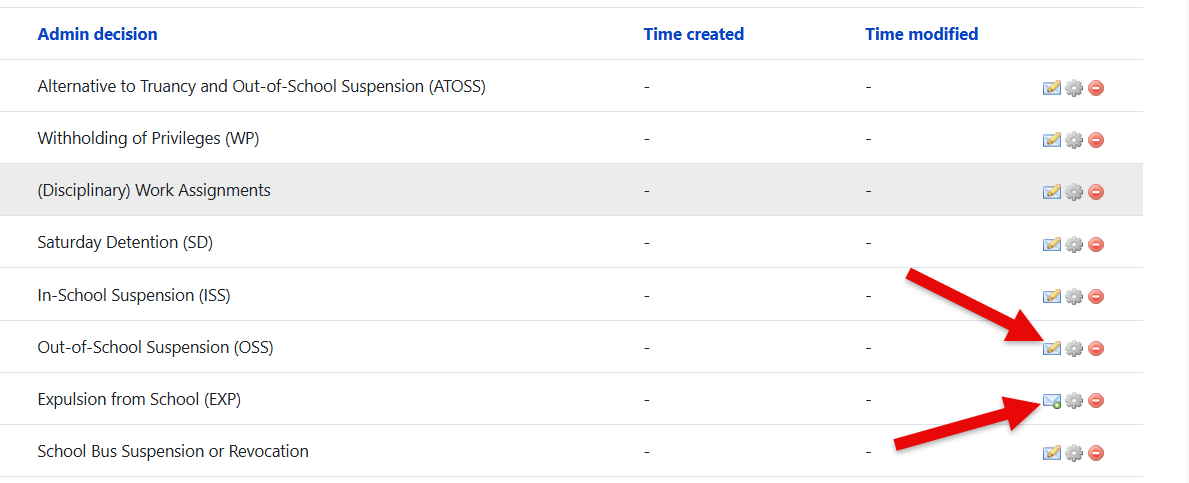
A letter template may be attached so the system can generate communication for parents or students.
-
During processing, the administrator selects the appropriate decision for the student case.
-
If notifications are enabled, the configured template is used to generate the message or printable letter.
A decision without a valid letter template may still be selectable, but it can prevent expected parent letter from being sent. If your school wants letters or automated notices, make sure each decision that will be used for communication has a completed template.
Administrative Decisions setup
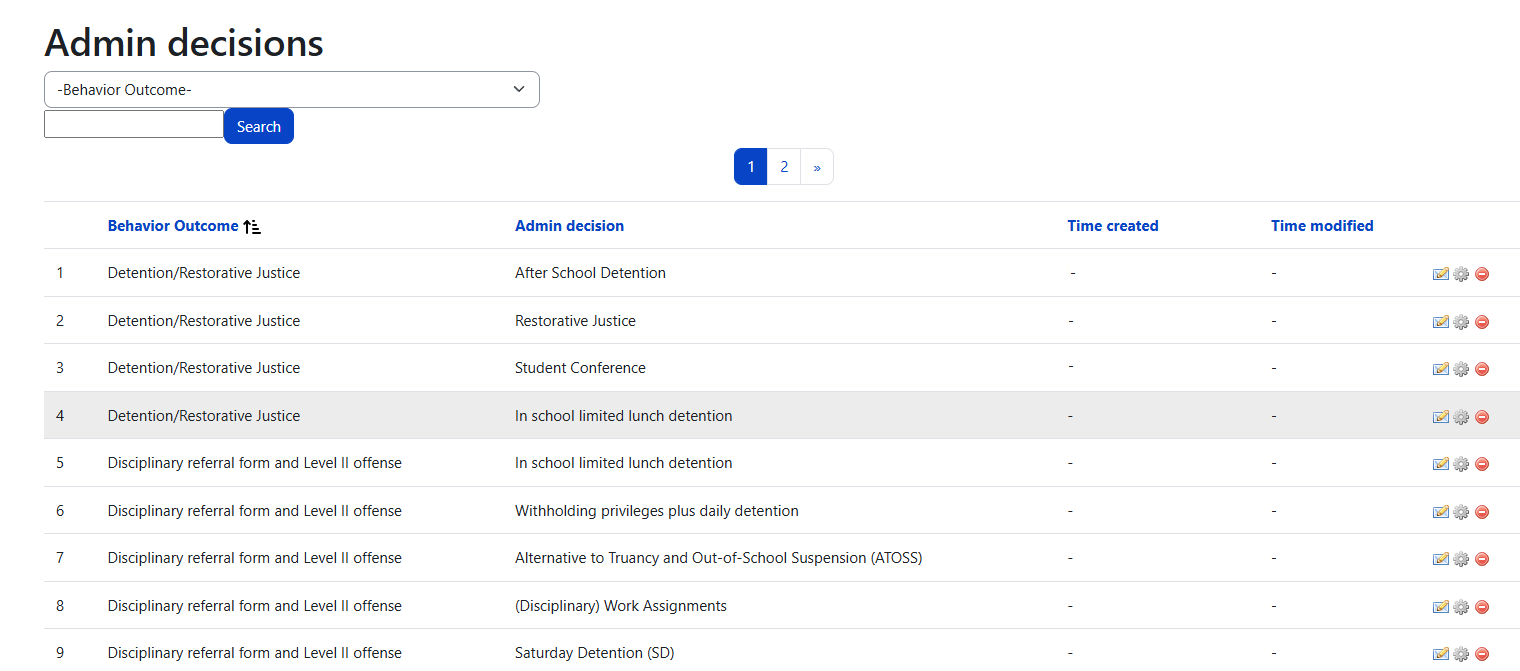
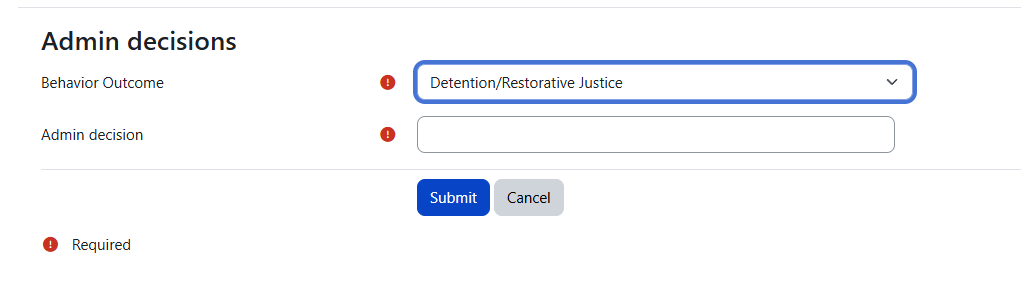
The Administrative Decisions page is the master list. It is where you add, edit, review, and organize the decisions staff will use later in workflow screens.
Typical information managed on this page
-
Behavior Outcome association so the decision aligns with the consequence or reward being processed
-
Admin Decision name or title shown to staff
Depending on your configuration and version, the list may also include edit actions, delete/archive actions, and links to manage templates.
Configuration guidance
|
Setup item |
Recommendation |
Reason |
|---|---|---|
|
Decision names |
Use plain, school-approved language |
Staff should immediately understand when to use each option |
|
Outcome mapping |
Link decisions only to the outcomes they truly support |
Prevents confusing or irrelevant choices during processing |
|
Template coverage |
Create a letter template for each decision that requires family communication |
Prevents gaps in notifications and printable letters |
|
Review process |
Audit this list before the school year starts |
Ensures labels, policy terms, and templates are current |
A good naming convention is to make the administrative decision reflect the final action, not the incident. For example, use decision names like After-School Detention, Parent Conference, or Out of School Suspension instead of generic names like Step 2 or Action A.
Letter Templates
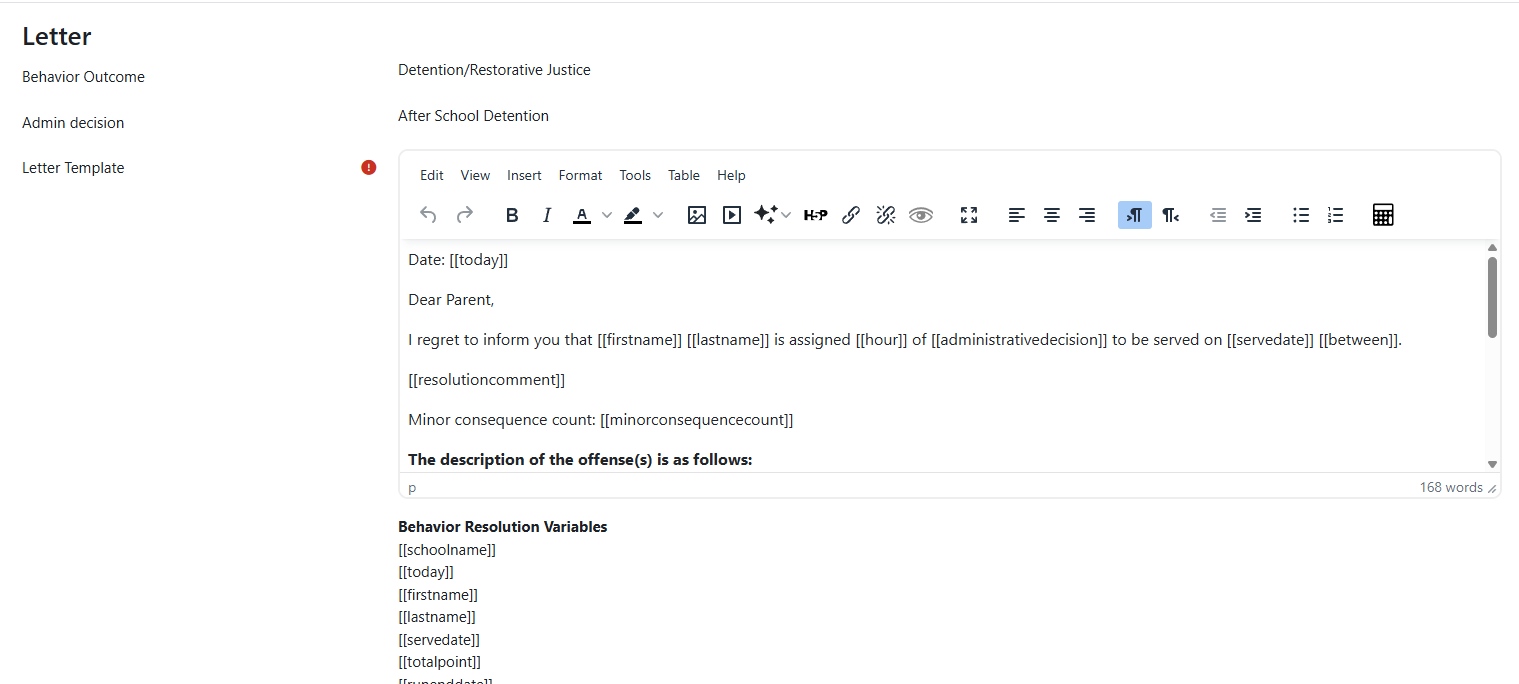
Letter templates are the reusable bodies of text attached to administrative decisions. They reduce manual editing, help your school keep a consistent tone, and support automated notifications. They are especially useful when the same decision is issued repeatedly throughout the year.
What a letter template usually includes
-
A greeting to the parent or guardian
-
Student- and case-specific merge variables
-
The outcome or decision details
-
Optional comments entered during processing
-
Signature or closing language configured by the school
Example letter template
The following sample shows how a school might combine letter text with Radix LMS merge variables. Use it as a starting point, then adjust the wording to match your handbook,
tone, and local policy.
Date: [[today]]

Dear Parent,

I regret to inform you that [[firstname]] [[lastname]] is assigned [[hour]] of [[administrativedecision]] to be served on [[servedate]] [[between]].

[[resolutioncomment]]

Minor consequence count: [[minorconsequencecount]]

The description of the offense(s) is as follows:

Our records indicate that your child has accrued [[totalpoint]] conduct points due to his/her violations up to date [[runenddate]]. The conduct points have been assessed based upon the minor violation discipline cycle in the [[schoolname]] Student Handbook.

[[datatable]]

Parents and students have instant access to the recorded information at Radix LMS dashboard. Administration will review the recorded Behavior Log weekly and give consequences accordingly. The consequences for points are as follows:

1-3 points/week: No consequence assigned. However points will be transferred to the following week.
4-9 points/week: Lunch detention/After School detention
10-15 points/week: Half Day ISS/Full Day ISS/Saturday Detention
16 or more points/week: Disciplinary referral form and Level II offense

Please feel free to contact me if you have any questions or concerns.
Sincerely,
[[schoolname]] Administration
When copying a sample into Radix LMS, verify each placeholder against the variable helper shown on your own site. Available variables may differ between behavior resolution templates and referral templates.
Example reward letter template
The following sample is for a positive behavior outcome linked to the Rewards behavior type. Schools can use this when the administrative decision represents an approval, recognition, award, or other positive action.
Date: [[today]]

Dear Parent,

We are pleased to inform you that [[firstname]] [[lastname]] has been recognized for positive behavior at [[schoolname]].

Administrative Decision: [[administrativedecision]]

[[resolutioncomment]]

The recognition is based on the following positive behavior record(s):

[[datatable]]

We appreciate [[firstname]]'s effort to demonstrate positive conduct and contribute to a respectful school community. Please join us in congratulating [[firstname]] on this achievement.

Thank you for your continued support.

Sincerely,
[[schoolname]] Administration
Before using this sample, verify that each placeholder is available in the reward or positive behavior template helper on your site. If your template helper uses different variables for reward workflows, copy those variables exactly.
Template best practices
-
Write in clear, family-friendly language.
-
Keep policy wording aligned with your student handbook.
-
Do not hard-code student-specific details into the template.
-
Use the provided variables exactly as documented in the form.
-
Test one sample decision before the school year begins.
Best practice: create a short set of standard templates for your most common administrative decisions first, test them in a sample workflow, and then expand only if needed.
Variable usage
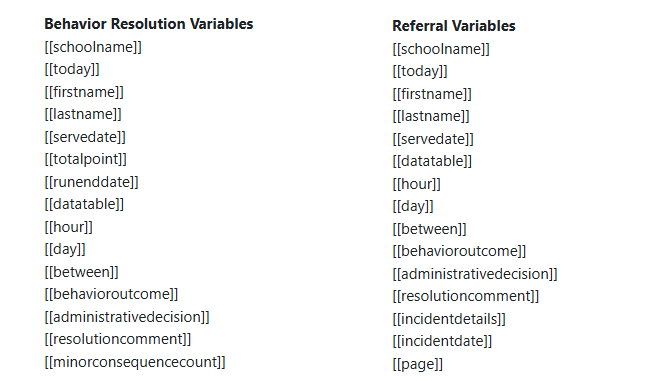
Radix letter templates can include dynamic placeholders that are replaced when the letter or notification is generated. The exact list shown in your form may vary, but these typically include student, school, run period, decision, and comment details.
Only use variables exactly as shown in the template help on your site. Changing the bracket format or misspelling a variable can cause the final letter to display raw placeholder text instead of real data.
Recent behavior system updates also clarified template terminology by renaming older labels such as Email Body to Letter Template and distinguishing Behavior Resolution Variables from Referral Variables.
Recommended setup order
-
Create your Behavior Outcomes first.
-
Add your Administrative Decisions using clear school-approved names.
-
Link each decision to the correct outcome or outcomes.
-
Create or paste the Letter Template for each decision that should send communication.
-
Review the wording for legal, handbook, and tone consistency.
-
Test a sample behavior resolution and a sample referral workflow.
Common issues and how to avoid them
|
Issue |
What it looks like |
How to prevent it |
|---|---|---|
|
No template attached |
The decision can be selected, but no parent letter or notification is generated as expected |
Attach a completed template to any decision that should communicate outward |
|
Too many similar decisions |
Admins are unsure which option to choose |
Consolidate overlapping decisions and use clearer labels |
|
Incorrect variable text |
Letters show raw placeholders instead of student details |
Copy variables exactly from the helper text in the editor |
|
Outdated wording |
Letters reference old policy language or past school years |
Review and refresh templates annually |
Permissions and access
This area is intended for school administrators or other users with behavior management configuration access. Staff who process entries may be able to choose from existing administrative decisions later in workflow screens without having permission to edit the master setup.
Related pages: Behavior Management System, Behavior Plugin Settings, Behavior System Changes & Recognition (Commendation) Point System