
This section defines how major behavior incidents are categorized and how escalating consequences are presented to staff. In Radix LMS, Major Offenses provide the offense codes and descriptions, while the Discipline Matrix uses those offenses together with configurable matrix columns to display consequence guidance in a grid.
Use this area when your school needs to define referral-level infractions and document the consequence progression for each offense. In most implementations, admins set up Major Offenses first, then Matrix Columns, and finally complete the Discipline Matrix rows.
What this section controls
|
Component |
Purpose |
Where it is used |
|---|---|---|
|
Major Offenses |
Creates the master list of referral-level offense codes and descriptions. |
Used as the selectable offense for Discipline Matrix rows and major incident workflows. |
|
Matrix Columns |
Defines the column headers in the matrix, such as escalating consequence levels or decision stages. |
Controls the structure of the Discipline Matrix grid. |
|
Discipline Matrix |
Maps each major offense to one or more consequence text values across the configured columns. |
Used by administrators and discipline teams as a reference for consequence progression. |
How these pages work
All three areas follow the same general administration pattern:
-
Open the list page to review existing records.
-
Select Add or edit an existing item.
-
Complete the required fields and save.
-
Use search and sorting tools on the list page to find records more quickly.
-
Use export options where available to download the current list.
The Discipline Matrix depends on both Major Offenses and Matrix Columns. If either one is incomplete, the matrix will be difficult or impossible to configure meaningfully.
Major Offenses
Major Offenses define the referral-level incident types available to the discipline process. Each offense has a code, a full description, and a short description.
|
Field |
Description |
Guidance |
|---|---|---|
|
Offense Code |
A required short code or identifier for the offense. |
Use a clear, consistent naming convention so offenses are easy to search and reference. |
|
Description |
A required full description of the offense. |
Write this as the formal definition staff should understand when selecting the offense. |
|
Short Description |
A required abbreviated version of the offense description. |
Keep this concise while still being recognizable to users. |
A consistent offense coding standard makes reporting and staff training much easier. For example, schools often group related incident types by prefix or by district discipline categories.
Matrix Columns
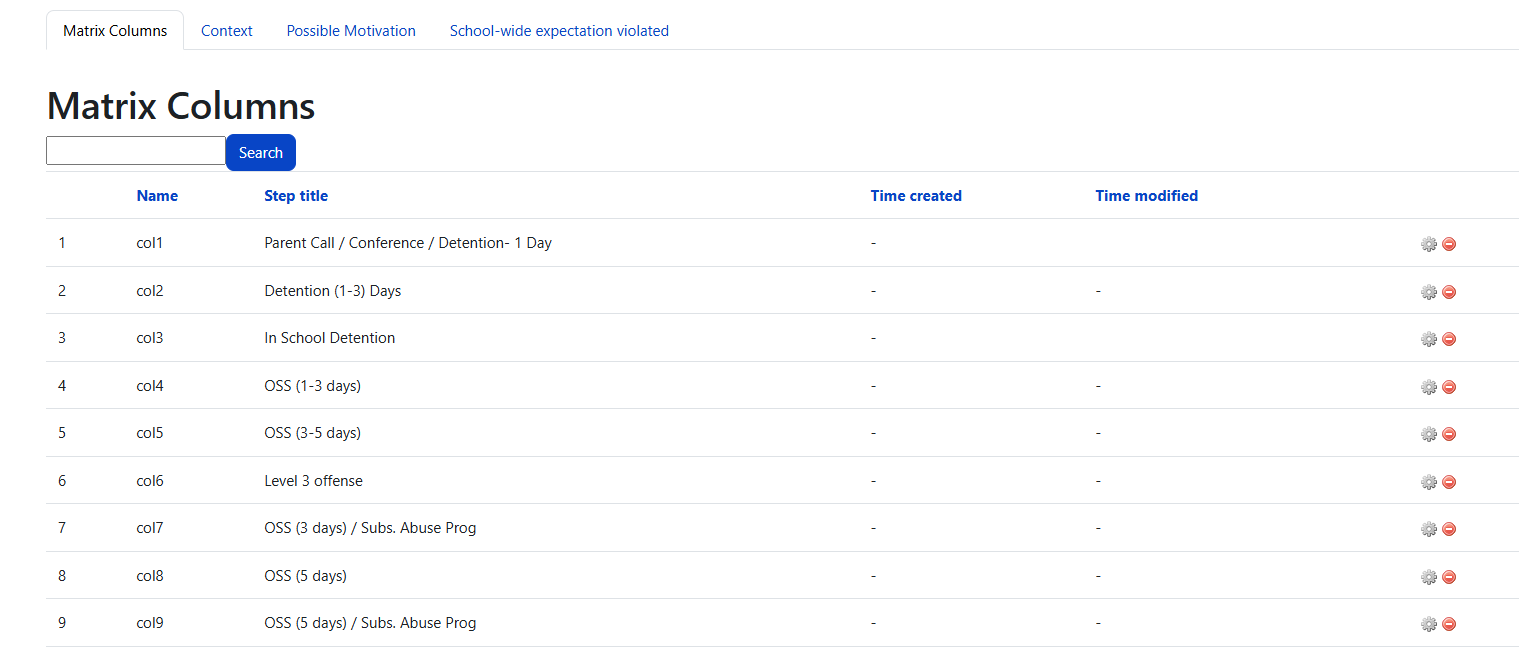
Matrix Columns define the headers used across the Discipline Matrix. These are the consequence stages or escalation levels shown from left to right in the grid.
|
Field |
Description |
Guidance |
|---|---|---|
|
Name |
The internal key for the column. |
This is commonly a system-style label such as |
|
Title |
The display label shown to users in the matrix. |
Use meaningful titles such as first offense, repeated offense, administrator action, or similar local terminology. |
|
Position |
The display order of the column in the matrix. |
Number positions carefully so the matrix reads in the intended left-to-right order. |
Create and finalize your Matrix Columns before entering Discipline Matrix rows. If column structure changes later, existing matrix content may need to be reviewed and updated for consistency.
Discipline Matrix
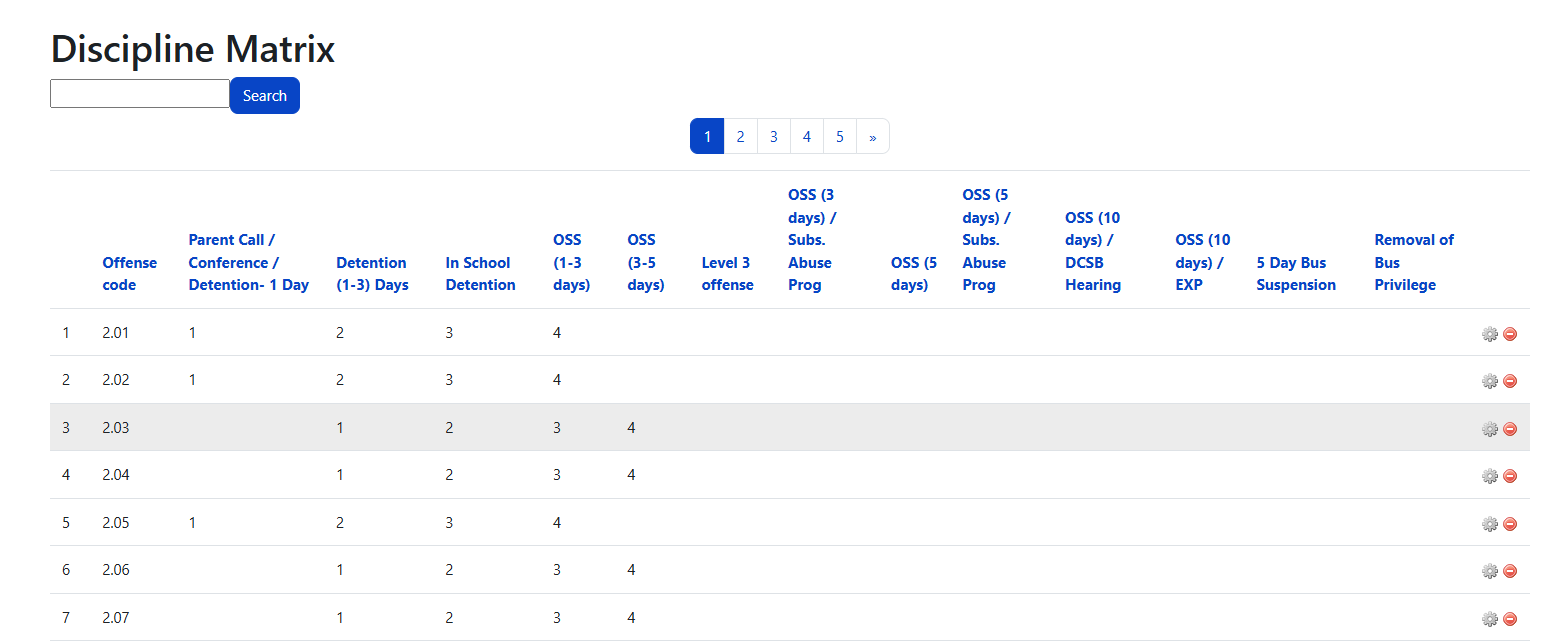
The Discipline Matrix connects each Major Offense to the configured matrix columns. Each row represents one offense, and each column contains the consequence or action text for that escalation stage.
|
Field |
Description |
Guidance |
|---|---|---|
|
Offense |
Selects the Major Offense for the matrix row. |
Each row should correspond to one clearly defined major offense. |
|
Column values |
One text field is shown for each configured Matrix Column. |
Enter the consequence, action, or decision guidance that applies at that stage. |
|
Page number |
Show where on school’s student handbook the offense and description can be found. |
Use a consistent page numbering scheme if your school organizes the matrix across multiple pages or sections of the student handbook. |
Because the matrix fields are generated from your Matrix Column setup, the number of visible consequence columns can vary by school configuration.
Recommended setup order
-
Create your Major Offenses.
-
Create your Matrix Columns in the intended display order.
-
Build the Discipline Matrix by pairing each offense with consequence text across the columns.
-
Review the completed matrix with discipline leaders or school administrators before broad staff use.
Following this setup order helps prevent rework and ensures the matrix reflects a complete, consistent discipline framework.
Best practices
-
Use language in offense descriptions that aligns with your school's discipline handbook or district policy.
-
Keep matrix column titles understandable to the people who will actually use the matrix.
-
Write matrix cell text clearly enough that staff can interpret the consequence progression consistently.
-
Review the full matrix after setup to ensure similar offenses are treated with comparable logic.
-
Revisit the matrix whenever discipline procedures or policy expectations change.
Troubleshooting and review tips
Permissions
Managing Major Offenses, Matrix Columns, and Discipline Matrix records requires the appropriate discipline management capability in Radix LMS. If a user cannot access or edit these areas, confirm that their role has the necessary permission assigned by the site administrator.