
The behavior forms setup area defines the dropdown values, scoring rules, and reference data used throughout behavior entries, referrals, run periods, and behavior reporting. These pages are typically maintained by school or district administrators before staff begin daily behavior processing.
Use these setup pages to establish a consistent behavior framework before teachers or administrators begin entering incidents. Changes made later can affect available selections, point totals, workflow behavior, and reporting.
What this section controls
Each setup page manages a specific part of the behavior system. Together, they determine what staff can select on forms, how incidents are scored, and how administrative workflows behave.
|
Setup area |
Purpose |
Used in |
|---|---|---|
|
Behavior Categories |
Defines broad behavior groups and category-level rules such as recognition, point limits, and whether a category can be used by teachers or ISS workflows. |
Behavior entries, run periods, discipline matrix, reporting |
|
Behavior Types |
Defines selectable behavior items within a category. |
Behavior entry forms, filtering, reports |
|
Behavior Steps |
Defines progressive consequence levels and point values. |
Behavior processing, run periods, interventions, matrix configuration |
|
Behavior Outcomes |
Defines outcome bands based on point ranges and type. |
Processing and consequence mapping |
|
Locations |
Stores the master list of physical or contextual locations. |
Behavior Locations mapping and form selection support |
|
Behavior Locations |
Maps locations to behavior categories and permission flags. |
Behavior entry forms and category-specific location control |
|
Major Offenses |
Defines major incident offense codes and descriptions. |
Referral and major incident workflows |
|
Interventions |
Defines interventions associated with behavior steps and points. |
Behavior processing and escalation workflows |
|
Contexts |
Defines contextual labels for referral records. |
Referral forms and reporting |
|
Expectations Violated |
Defines school expectations that may be violated. |
Referral forms and reporting |
|
Motivations |
Defines possible motivations associated with incidents. |
Referral forms and reporting |
|
Periods |
Defines discipline periods and period codes tied to categories. |
Behavior forms, filters, and reporting |
How these setup pages work
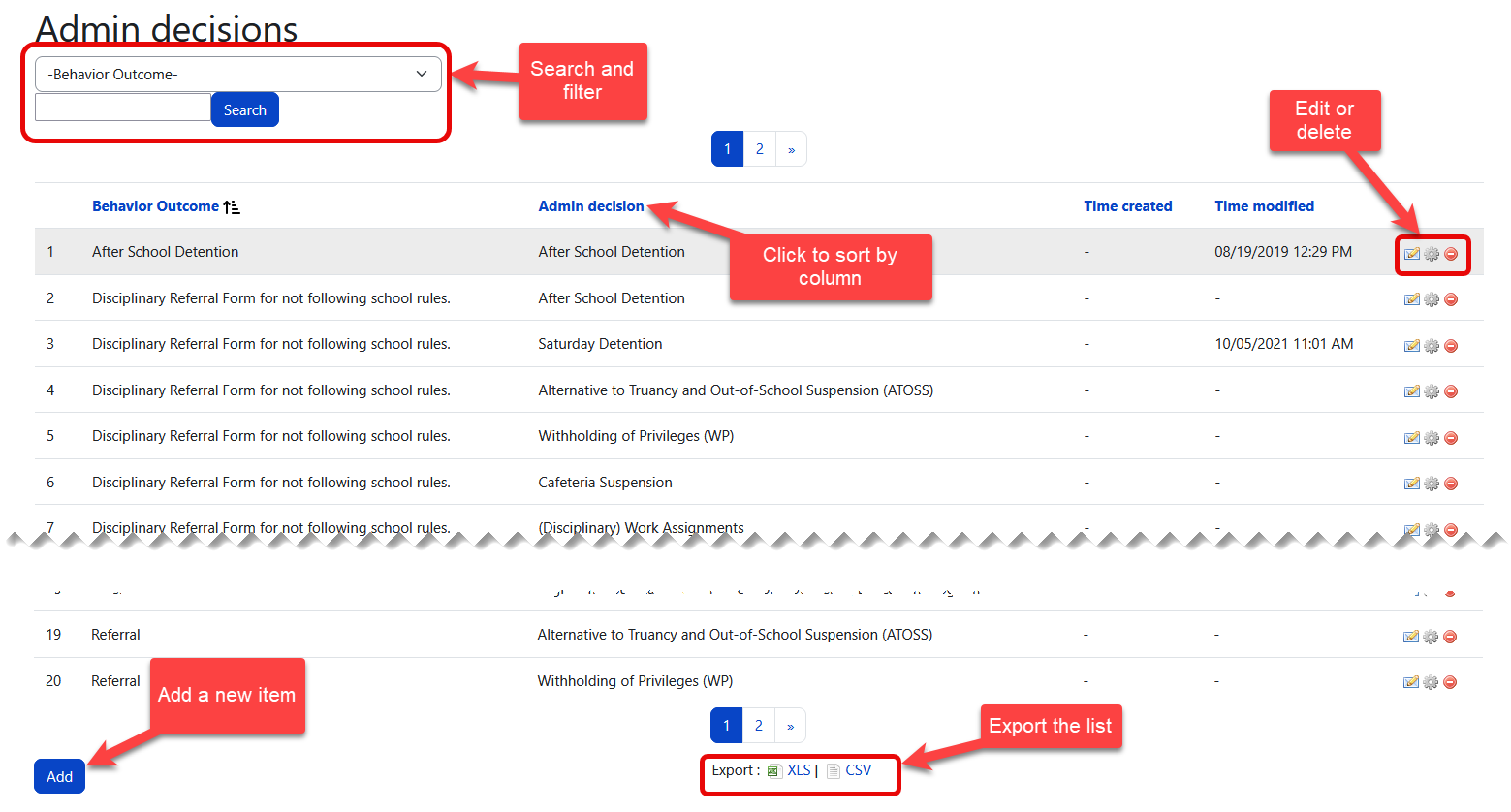
Most behavior setup pages follow the same administrative pattern: a list page for review and search, plus an add/edit form for maintaining records.
-
List pages usually support search, sorting, and row-level edit actions.
-
Many pages support export options for administrative review.
-
Records may be hidden from active use without fully removing historical references, depending on the page and system logic.
-
Changes take effect wherever that setup value is referenced in the behavior workflow.
Before changing scoring, point ranges, or category rules, confirm how the value is currently used in behavior runs, consequence processing, and reports.
Behavior Categories
Behavior Categories are the foundation of the behavior system. They define the broad groupings used by behavior types, steps, periods, behavior locations, and point-based processing.
|
Field |
Type |
Description |
|---|---|---|
|
Name |
Text |
The display name of the category. |
|
Recognition |
Checkbox / flag |
Indicates whether the category represents positive recognition rather than a disciplinary incident. |
|
Allow ISS |
Checkbox / flag |
Allows the category to participate in ISS-related workflows. |
|
Allow Teacher |
Checkbox / flag |
Allows teacher-facing use of the category in behavior entry workflows. |
|
Position |
Numeric |
Controls the display order in dropdowns and lists. |
|
Countable |
Checkbox / flag |
Determines whether entries in this category contribute to point or incident counting logic. |
|
Limit Number |
Numeric |
Defines the threshold after which alternate point handling may apply. |
|
Point |
Numeric |
Default point value applied before the limit is reached. |
|
Point After Limit |
Numeric |
Point value applied after the configured limit number is exceeded. |
Set category order intentionally. Staff often select categories from dropdowns, so a clean order improves speed and consistency.
Behavior Types
Behavior Types define the specific selectable behaviors that belong to a category. These are typically the items staff choose when recording a behavior event.
|
Field |
Type |
Description |
|---|---|---|
|
Category |
Dropdown |
Associates the type with a behavior category. |
|
Name |
Text |
The display name of the behavior type. |
|
Position |
Numeric |
Controls display order within the category. |
Because behavior types depend on categories, categories should be created first.
Behavior Steps
Behavior Steps define progressive consequence levels used during behavior processing. These steps can also carry separate point values depending on workflow context.
|
Field |
Type |
Description |
|---|---|---|
|
Name |
Text |
The name of the step or consequence level. |
|
Description |
Text |
Optional explanatory text for administrators. |
|
Position |
Numeric |
Controls display order. |
|
ISS Point |
Numeric |
Point value used in ISS-related behavior handling. |
|
Teacher Point |
Numeric |
Point value used in teacher-managed behavior handling. |
|
Active |
Checkbox / flag |
Determines whether the step is available for use. |
If points are adjusted after behavior data already exists, recheck downstream processing rules and reports to confirm existing entries still align with school expectations.
Behavior Outcomes
Behavior Outcomes define consequence or outcome bands based on point ranges. These records help translate accumulated points into a resulting action type.
|
Field |
Type |
Description |
|---|---|---|
|
Type |
Dropdown |
The outcome classification: Minor (minor consequence — e.g., detention, lunch detention), Major (referral-level consequence — e.g., suspension, expulsion), or Reward (positive recognition outcome — e.g., certificate, privilege pass). The type determines how the system processes the outcome during a run period: Minor outcomes generate behavior resolutions, Major outcomes generate referral-level consequences, and Reward outcomes generate positive recognition resolutions. |
|
Min Point |
Numeric |
The minimum point value for the range. |
|
Max Point |
Numeric |
The maximum point value for the range. |
Point bands should be reviewed carefully to make sure they are complete, non-overlapping, and aligned with the intended behavior process.
Points and Scoring
The behavior system uses three methods to assign points to entries. Schools should choose one primary method for each category and avoid mixing category-level and step-level points for the same category.
Three point assignment methods
|
Method |
How it works |
Configured in |
Example |
|---|---|---|---|
|
Direct Points (via Behavior Steps) |
Each behavior step carries a fixed point value (ISS Point or Teacher Point). Points are assigned immediately when the entry is created. |
Behavior Steps → ISS Point / Teacher Point fields |
"3rd Poor Choice" step = 2 points |
|
Progressive / Limit-Based Points (via Behavior Category) |
The category is marked as Countable with a Limit Number. Entries below the limit are recorded as warnings with zero points. After the limit is exceeded, entries receive the Point After Limit value. |
Behavior Categories → Countable, Limit Number, Point, Point After Limit fields |
Tardy category: Limit = 1 → first entry is a warning (0 points), second entry and beyond earn the configured points |
|
Intervention Points (additive) |
Each intervention selected on the behavior entry adds its own point value on top of the step or category points. Multiple interventions stack. |
Interventions → Point field |
"Talking out of turn" intervention = +0.5 points added to the step total |
Do not add points to both the category and step level for the same category. Choose one method — either category-level progressive points or step-level direct points — and configure the other as zero. Mixing methods causes unpredictable point totals and complicates run period processing.
Warnings vs. pointed entries
Not every behavior entry carries points. An entry is recorded as a warning when:
-
The selected behavior step has a point value of zero (for example, "Verbal Warning").
-
The category uses the progressive/limit-based method and the student's entry count has not yet exceeded the configured limit.
Warnings are still tracked and visible in reports. They count toward incident totals and can contribute to reaching the limit threshold in progressive categories.
Point values and precision
-
Step point values support decimal values up to the tenths place (for example, 0.1, 0.5, 2.9).
-
Intervention point values also support decimals.
-
Behavior Outcome ranges (Min Point / Max Point) should account for decimal totals when defining consequence bands.
Point visibility after processing
-
Before a run period is processed, entries display the point value assigned at entry time.
-
After a run period processes, the system may recalculate and display updated point values, including for limit-based entries that were originally recorded as warnings.
-
Reset (voided) entries have their points tracked separately as voided points for reporting purposes.
When adjusting point values in Behavior Steps, Interventions, or Behavior Categories after data already exists, review downstream processing rules, outcome ranges, and reports to confirm that existing entries still align with school expectations.
Locations
Locations provide the master list of places or contexts where incidents may occur. Locations are the base records. Behavior Locations are the category-specific mappings that determine where a category can be used and whether teacher or ISS workflows are allowed for that location/category combination.
Behavior Locations
Behavior Locations connect locations to behavior categories and add permission-related controls.
|
Field |
Type |
Description |
|---|---|---|
|
Category |
Dropdown |
The behavior category this mapping applies to. |
|
Location |
Dropdown |
The linked location from the master location list. |
|
Allow ISS |
Checkbox / flag |
Allows the mapping to be used in ISS-related workflows. |
|
Allow Teacher |
Checkbox / flag |
Allows the mapping to be used in teacher-facing workflows. |
Major Offenses
Major Offenses define the offense codes and descriptions used in referral and major incident workflows.
|
Field |
Type |
Description |
|---|---|---|
|
Offense Code |
Text |
A short code used to identify the offense. |
|
Description |
Text |
The full offense description shown to users and in reports. |
|
Short Description |
Text |
An abbreviated label for compact displays or summaries. |
Use clear, consistent offense language. Referral workflows, letters, and reports are easier to interpret when codes and descriptions follow the same naming pattern.
Interventions
Interventions define intervention actions tied to behavior steps and point values.
|
Field |
Type |
Description |
|---|---|---|
|
Name |
Text |
The intervention name. |
|
Behavior Step |
Dropdown |
The linked behavior step. |
|
Point |
Numeric |
The point value associated with the intervention. |
Contexts
Contexts provide additional situational labels for referrals and related reporting.
Expectations Violated
Expectations Violated stores the school wide expectations that can be associated with an incident or referral.
Motivations
Motivations define the possible reasons or drivers associated with a behavior incident.
Periods
Periods define discipline-related periods and codes tied to behavior categories.
|
Field |
Type |
Description |
|---|---|---|
|
Behavior Category |
Dropdown |
The behavior category associated with the period. Usually “Tardy”, “Tardiness”. |
|
Name |
Text |
The period name. (Period-01, Period-02…) |
|
Code |
Text |
A short period code for administrative use. |
Common tools on list pages
|
Feature |
What it does |
Why it matters |
|---|---|---|
|
Search |
Filters list results to help administrators locate existing records quickly. |
Reduces duplicate entries and speeds up maintenance. |
|
Sorting |
Reorders visible data by common fields such as name or position. |
Makes it easier to review setup consistency. |
|
Edit actions |
Opens an existing record for updates. |
Supports ongoing refinement without recreating records. |
|
Export |
Downloads list data where supported. |
Useful for audits, review, or cleanup planning. |
Recommended setup order
-
Create Behavior Categories.
-
Add Behavior Types for each category.
-
Set up Behavior Steps and confirm point logic.
-
Create Behavior Outcomes for point-range processing.
-
Add base Locations.
-
Map Behavior Locations to categories.
-
Create Major Offenses for referral workflows.
-
Set up Interventions, Contexts, Expectations Violated, and Motivations.
-
Finish with Periods and validate dropdown behavior across forms.
A complete setup sequence makes later pages easier to configure, especially the discipline matrix, referral processing, run periods, and reports.
Sample Recognition Category Setup
The following example shows a complete recognition category configuration. Use it as a reference when setting up positive behavior tracking for the first time.
Category
|
Field |
Example value |
|---|---|
|
Name |
Recognition / Positive Behavior |
|
Recognition |
✅ Checked |
|
Allow Teacher |
✅ Checked |
|
Countable |
Unchecked (using step-level direct points instead) |
Behavior Types (optional)
|
Type name |
Position |
|---|---|
|
Helping Others |
1 |
|
Following Directions |
2 |
|
Class Participation |
3 |
|
Neat Work Habits |
4 |
|
Positive Attitude |
5 |
Behavior Steps
|
Step name |
Teacher Point |
Description |
|---|---|---|
|
Verbal Recognition |
0 |
Recorded as a warning — no points assigned |
|
Reward Point (+1) |
1 |
Standard recognition point |
|
Reward Point (+3) |
3 |
Higher-value recognition for exceptional behavior |
Behavior Outcomes (Reward type)
|
Outcome name |
Type |
Min Point |
Max Point |
|---|---|---|---|
|
Bronze Level |
Reward |
2 |
5 |
|
Silver Level |
Reward |
6 |
10 |
|
Gold Level |
Reward |
11 |
15 |
|
Platinum Level |
Reward |
16 |
999 |
Admin Decisions (linked to outcomes)
|
Decision |
Suggested outcome level |
Sample message |
|---|---|---|
|
Shout-Out Granted |
Any level |
“Thank you for contributing positively this week. Keep it up!” |
|
Parent Notified |
Silver and above |
“Your child has shown strong positive behavior in class this week. We're proud of their efforts.” |
|
Weekly Star Certificate |
Gold and above |
“Excellent work this week! Your attitude and actions made a real difference.” |
|
Principal Recognition |
Platinum |
“You've been a true leader and example to your peers. Congratulations on your achievement!” |
Tip: This example uses weekly run periods with step-level direct points. Do not add points at both the category level and step level for the same category — choose one method. See the Points and Scoring section above for details.
Safely removing setup records
Not every setup record can be deleted safely. Some records support visibility suppression, which removes them from teacher-facing or ISS-facing workflows without removing the underlying record. Other records are delete-or-keep only, so they should remain in place if they have ever been used in behavior history, processing, or reports.
Suppress records instead of deleting when possible
|
Setup area |
Available method |
Effect |
|---|---|---|
|
Behavior Categories |
Allow Teacher and/or Allow ISS |
Removes the category from the corresponding teacher or ISS workflows while preserving the record for history and administrative reference. |
|
Behavior Steps |
Allow Teacher when teacher-facing visibility should be removed |
Allow Teacher controls whether the step is available in teacher-facing workflows. |
|
Behavior Locations |
Allow Teacher and/or Allow ISS |
Removes the category-location mapping from the corresponding teacher or ISS workflows while keeping the mapping available for historical context. |
Records without a suppression option
The following setup areas are generally delete-or-keep records. If one of these values has already been used, leave it in place to preserve historical data:
-
Behavior Types
-
Behavior Outcomes
-
Locations
-
Major Offenses
-
Interventions
-
Contexts
-
Expectations Violated
-
Motivations
-
Periods
When deletion is safe
-
The record was just created and has never been used in a behavior entry, referral, run period, or report.
-
The record is a duplicate or typo that was caught before staff began entering data with it.
When to suppress instead of delete
-
The record has ever been referenced in a behavior entry, referral, run period result, or exported report.
-
The record is seasonal, year-specific, or no longer used, but may still be needed for historical lookup.
-
The record affects point logic, category selection, teacher-facing forms, ISS workflows, or run period processing.
Risks of deleting referenced records
|
Setup area |
What depends on it |
Risk if deleted |
|---|---|---|
|
Category |
Types, steps, behavior locations, periods, run periods, discipline matrix |
Entries may lose their category label, and dependent types or locations may become orphaned. |
|
Type |
Behavior entries that selected the type |
Entries may display a blank or broken type reference. |
|
Step |
Interventions, pointed entries, teacher/ISS point logic, run period processing |
Point history may become inconsistent, and interventions may lose their step link. |
|
Outcome |
Run period consequence mapping and administrative decision workflows |
Processed results may reference a missing outcome band. |
|
Location / Behavior Location |
Behavior entry forms and location-based filtering |
Staff may lose expected form selections, and historical entries may show gaps. |
|
Intervention |
Entries that included the intervention and additive point totals |
Point calculations and reports may no longer match the original behavior record. |
|
Period |
Behavior forms, filters, category-specific period setup, and reports |
Period-based reports and form behavior may lose the original reference. |
Recommended workflow before deleting
-
Search for existing behavior entries, referrals, exports, reports, or run periods that reference the record.
-
If references exist and the record supports suppression, use Allow Teacher, Allow ISS instead of deleting.
-
If references exist and no suppression option is available, do not delete the record. Keep it to preserve historical data.
-
If no references exist, delete the record, then confirm the related forms and list pages still behave correctly.
-
Document mid-year removals so other administrators understand why a value disappeared from active workflows.
Mid-year deletions can affect run periods that have already been processed. Removing a step, outcome, or category will not undo processed results, but it may cause errors or missing references if the run is reviewed or reprocessed later.