
This page explains what students and parents can see in the Behavior area of Radix LMS. It is written for families, but school staff can also use it when answering questions about behavior records, recognitions, rewards, and notifications.
Use this page when introducing families to the behavior dashboard, explaining what different sections mean, or clarifying why a notification was received.
How to access the dashboard
-
Students: Log in to Radix LMS and open the Behavior area from the dashboard.
-
Parents: Log in to Radix LMS, select the student if needed, and open the Behavior area from the dashboard.
-
School staff: Use this guide when supporting families or explaining how behavior information appears from the student/parent perspective.
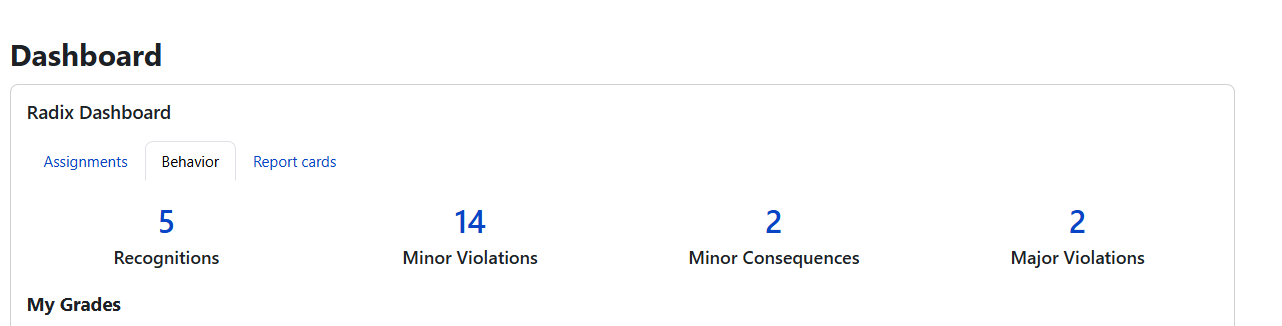
What families can see
The dashboard organizes behavior information into four main sections.
|
Section |
What it shows |
|---|---|
|
Minor Violations |
Lower-level behavior entries such as tardiness, dress code, or classroom disruptions. |
|
Major Violations |
Referral-level incidents that require administrative review and decision-making. |
|
Recognitions |
Positive behavior entries such as leadership, helpfulness, or academic effort. |
|
Rewards |
Rewards earned from accumulated recognition points, based on rules defined by the school. |
Understanding each section
Minor Violations
This section shows lower-level behavior entries recorded during the school year.
-
Families may see details such as the date, category, type, step, and status.
-
Status may indicate whether the entry is still pending or has already been processed.
-
If the school uses notifications for minor behavior updates, parents may also receive an email when an entry is created or resolved.
Major Violations
This section shows more serious incidents that typically move through an administrative review process.
-
Families may see the date, incident type, administrative decision, and outcome.
-
Major incidents often generate parent communication once the referral has been reviewed.
-
The exact wording of decisions and outcomes depends on how the school configured its behavior process.
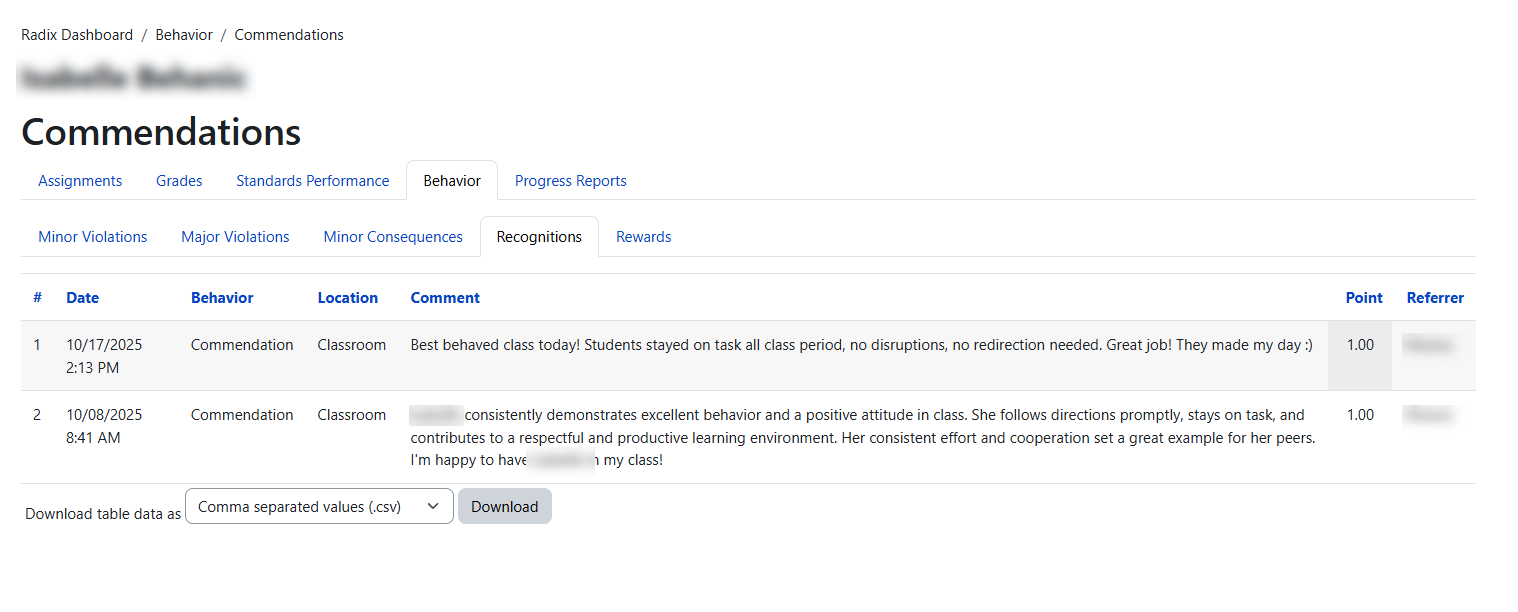
Recognitions
This section shows positive behavior entries.
-
Examples may include helping others, leadership, participation, citizenship, or strong academic effort.
-
Families may see the date, recognition type, and any points earned.
-
Recognition points may contribute toward reward levels if the school has enabled rewards.
Rewards
This section shows rewards a student has earned from recognition points.
-
Rewards are configured by the school.
-
The dashboard may display the reward level, date earned, and related information.
-
Some schools use tiered rewards such as Bronze, Silver, Gold, or Platinum, but names and thresholds can vary.
|
Sample reward tier |
Example point threshold |
Example school-defined reward |
|---|---|---|
|
Bronze |
10 points |
Certificate or recognition note |
|
Silver |
25 points |
School-defined incentive |
|
Gold |
50 points |
Special privilege or celebration |
These are examples only. Each school defines its own reward names, point thresholds, and incentives.
Email notifications families may receive
Depending on school settings, parents may receive notifications when a behavior entry, recognition, referral, or resolution is recorded.
These messages are generated automatically from school-defined templates. The exact wording may vary by school, but the message usually includes the student's name, the type of behavior item, and a link or direction for follow-up.
Sample behavior entry notification email
Sample subject: Behavior Notification for Alex R.
Sample message:
Dear Parent/Guardian,
This is to inform you that a new Recognition has been recorded for Alex R.
Behavior type: Helping Others
You can review additional details using the behavior report link provided in your parent portal.
If you have questions, please contact your school directly.
Thank you.
This sample reflects the system-supported placeholders used in notifications, such as behavior type, student first name, student last initial, and report links.
Frequently asked questions
What if I see a behavior entry I do not understand?
Contact the teacher, dean, or school administrator for clarification. The dashboard is meant to provide visibility, but school staff can explain the context of a specific entry.
What does a voided entry mean?
A voided entry is a record that was reset by the school. Depending on school settings, it may still appear for reference, but it does not function like an active entry.
Why did my child receive a recognition but not a reward?
Recognitions and rewards are not the same thing. A recognition is a positive behavior entry. Rewards are earned only when the school's reward criteria or point thresholds are met.
Will parents always receive an email?
Not always. Email notifications depend on how the school configured the behavior plugin and its notification templates.
Can families see previous school years?
What is visible depends on school configuration and report access. If a family needs older records, they should contact the school directly.
Guidance for school staff
Use this page when explaining the dashboard to families in simple language. Avoid internal setup terminology unless the audience is administrative staff.
-
If a family asks why a reward appears, review the recognition points and reward thresholds configured by the school.
-
If a family asks why an email wording looks different, check the notification templates configured in the plugin settings.
-
If a family asks about missing or hidden entries, review whether the item was processed, voided, or excluded by configuration.